Pages

Showing posts with label Steve Clark. Show all posts

Tuesday, 8 March 2016

We're Back and Looking for Contributors!

It's been a quiet year so far on YYCLC. Settling into middle school has taken a little more of my time than expected. Now that we have had more than half a year pass by, it's time to start firing up the #yyclc engines once again.

We're looking for new and past contributors to share LC stories. Are you connected to a Learning Commons in Calgary and/or surrounding area? Are you willing to share a story from something that happened in your LC? We'd love to hear from you!

If you're interested, please leave a comment on this post with some way to get in touch with you and I will contact you soon!

Some of stories we hope to share from the #NCKodiaks Learning Commons over the next little while are:
  • Community Maker night at Nose Creek School
  • 3D printing in the Learning Commons
  • It take a Community to Build a Learning Commons
I look forward to hearing from some new contributors!

Wednesday, 9 December 2015

What is a Learning Commons in 2015

By Annette Bennett and Steve Clark

So I find myself moving to my third learning commons in as many years and once again defining what a learning commons should look like. This process is never ending. We are finding it needs to be continually revisited to ensure we are meeting the needs of our students as best as possible.

A key point to remember is that the Learning Commons model does not replace the library, but rather, it enhances it.

People are always asking, "What is a Learning Commons?", "What is the difference?" 
A Learning Commons needs to be a for students. Not for storage of textbooks, outdated resources or technology that nobody knows what to do with. 

Annette and I decided to reflect on some things we have learned in our collective journey:
  • An important step and one of the hardest is to cancel full class book exchange. Once this happens, it frees up the Learning Commons Assistant to support students more effectively.
  • He/she is then able to support students.  Learning Commons needs to be for students. 
  • The students are told that this was not to be a "quiet" space but it needs to be a respectful place.
  • The students need to have ownership in the space for them to want to use it and take care of it. They are the decisions makers, especially if you want them to be there.  
  • Since Nose Creek School began in 2012 we opened as a Learning Commons - a space for the students. The students have always been involved in the decision making process. 
  • They asked for bean bags, lego, lego walls, building straws, Apples to Apples, Monopoly, Uno and Twister. 
  • The L.C. is always busy. Lunch time in the Nose Creek L.C.  is always active  with students building, puzzlemaking and playing games with their friends.
  • Students should be able to access things that they can't necessarily access in the classroom or at home. 
  • We provide multiple areas for students to collaborate.
  • Lots of different places students can work at high tables, low tables, White boards and glass tables to write on, carpets, stools, bean bags and standing areas.
  • We have students helping on a daily basis - locking computers up, closing blinds, returning books to shelves, signing books back in, reorganizing tables and cleaning up. 

About the Authors:

Annette is the Learning Commons Assistant at Nose Creek. She has worked in this great space since its creation in 2012. 

Steve is the Learning Leader of Technology and the Learning Commons at Nose Creek School. He has transitioned two elementary learning commons. This is his first year at Nose Creek. 

Thursday, 11 June 2015

#YYCLC Day 174: Grade 1 and Google Presentations

These grade 1 students have been working hard to transfer their research into a Google Presentation (for the first time). So far, we have learned to:

  • Create a Google Presentation
  • Use Google's Research tool
  • Add 'free to use' creative commons licensed pictures and make them full screen
  • Add text and manipulate it

Wednesday, 3 June 2015

#YYCLC Day 169

It's awesome to have students share their new learning with their peers. Here, a grade 2 student is showing how he learned to use the subtract tool in the Morphi App when designing in 3D.

Tuesday, 2 June 2015

#YYCLC Day 168: Design Thinking and 3D Printing


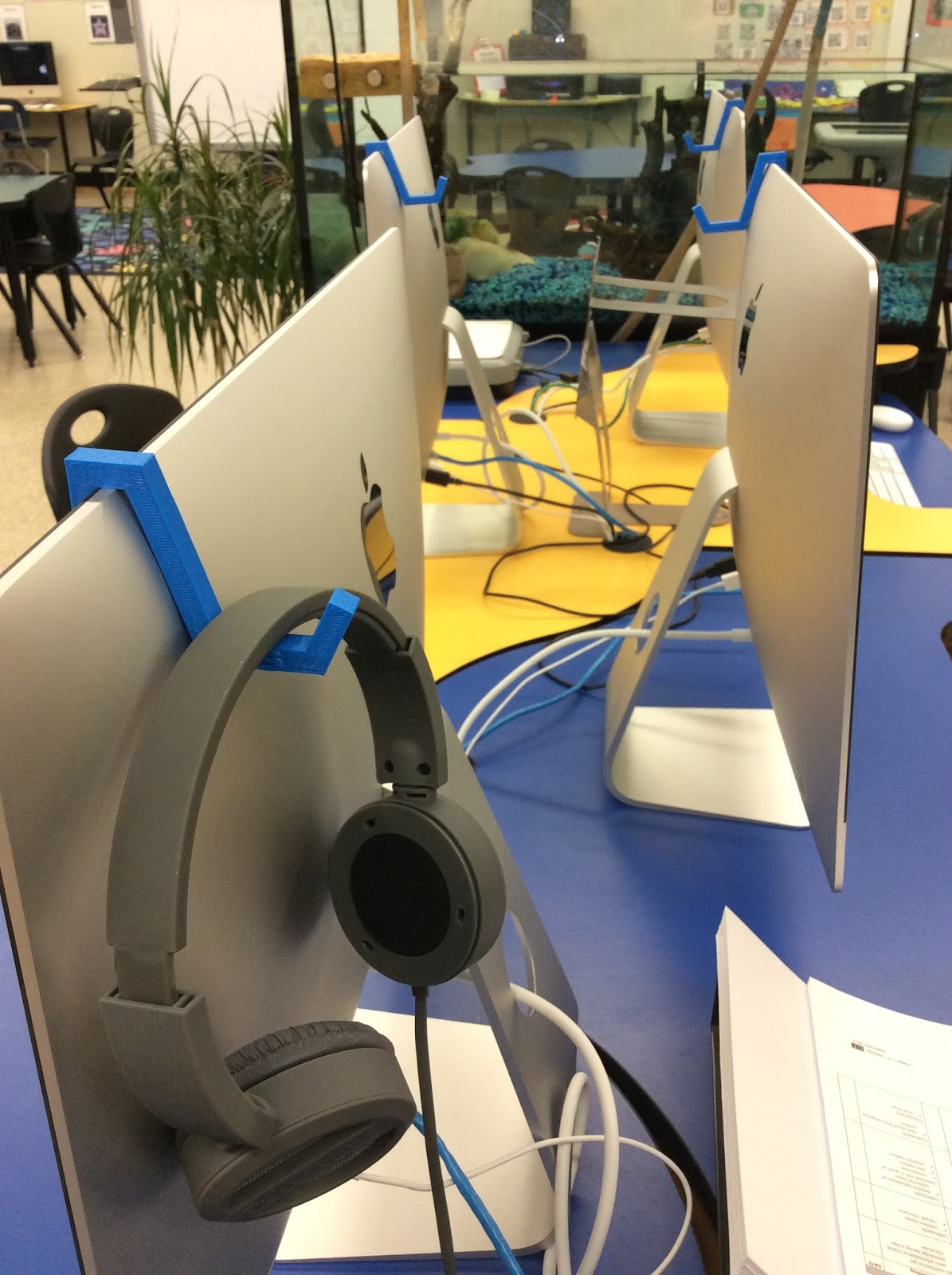
One thing that we have always needed is a way to keep our headphones organized. What better way to do so than to design and print a solution to this problem. Thanks to Morphi app and our MakerBot 3D printer, we were able to do so with ease! 

Monday, 1 June 2015

#YYCLC Day 167: The Triops is growing!


Our pet Triops is growing fast by the day. In it's spare time, he/she likes to do flips and somersaults in the water!

Friday, 29 May 2015

#YYCLC Day 166: Improving the Physical Space


This month we ordered and received some new book shelves from Moen Woodworks for our learning commons thanks to our Education Matters grant. It's nice to be abel to slowly change and improve our physical space to meet the needs of our students. 

Thursday, 28 May 2015

#YYCLC Day 165: Designing Metroplis

Grade 3 is currently working to design a piece of metropolis using Morphi App. We are integrating math and science to building and print city in our classroom.

Wednesday, 27 May 2015

#YYCLC Day 164: Interactive Displays!

This grade 5 class has been busy putting together an interactive display in the learning commons. They have been working on creating websites to go with their 3D Map they created with plastercine. The websites are linked to and accessed via the QR codes.

Friday, 22 May 2015

#YYCLC Day 161: AkkermanLC in Time Lapse


Here is another take on the celebration of learning we had this week for the grade 2 boat building project!

Thursday, 21 May 2015

Wednesday, 20 May 2015

#YYCLC Day 159: The LC Can Be A Busy Place!


Today the Learning commons was busy! Here's what was happening during our middle block, between recess and lunch

  • 1 whole grade 2 class was in the computer lab doing a an SLA field test
  • Another grade 2 small group was working at the SMART board doing some math
  • We had three Calgary Reads volunteers working grade 1 students in small groups
  • There were Grade 4 students working on a health project in a small group
  • There were grade 5 students working on another health project
Not everyday is like this but it was amazing to see the LC so busy and being utilized by so many grades at once!

Tuesday, 19 May 2015

#YYCLC Day 158: Celebrating Learning


This Grade 2 class celebrated learning by presenting their boats and design videos to other classes in the school. They enjoyed telling the story of their learning!

Tuesday, 12 May 2015

#YYCLC Day 155: Weekly Girls Club

This week our Chris Akkerman Girls Club is working on a project about what they want to BE. The meet weekly in the Learning Commons at lunch time.

Monday, 11 May 2015

#YYCLC Day 154: What App Did You Use Today?

Today I made a display that I've been meaning to make for a while. This is to help students and teachers remember about some of our key CREATING Apps that we love!

Friday, 8 May 2015

#YYCLC Day 153: Boat Building

The grade twos at Chris Akkerman School have just about finished their boat building project. More to come on this great design project. 

Thursday, 7 May 2015

#YYCLC Day 152: 3D Printer in Action


Today we were printing student designed keytags. The whole school is interested in this! It might take a while to get through all 600 students.

A video posted by Steve Clark (@stevewclark) on

Wednesday, 6 May 2015

#YYCLC Day 151: Assessment in the LC

Sometimes teachers need to bring students to the LC to do some kind of assessment. This is a kindergarten teacher recording some student voice. 

Tuesday, 14 April 2015

#YYCLC Day 135: 3D Design and Printing


At CHris Akkerman, we are all keen to see how the 3D printing will fit into learning. To start with, we are designing key chains with names on them. This is a way for student to learn the basics of designing some using Morphi App on our iPads.

Monday, 13 April 2015

#YYCLC Day 134: We are 3D Printing!


It's safe to say that today bought a lot of energy into our learning commons! Our students are so excited about the possibility of printing something on the 3D printer. Today we started working with Morphi, an easy to use, 3D designing App.